

Mac OSX
DoublePi Technologies Vovious v1.0.6 [MacOSX]
Team Flare | 01 January 2026 | 15 MB
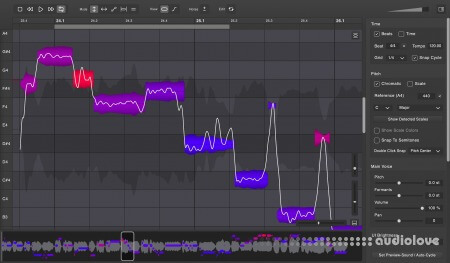
Vovious is a vocal-editing and pitch-correction tool that combines
neural-network pitch detection with a modern, DAW-integrated
interface. It allows precise control over pitch, slope, vibrato,
formants, and amplitude, and it includes advanced tools such as
freehand pitch drawing and a temporary-note editor for micro-level
adjustments. Timing can be corrected visually through a color-coded
grid that shows how notes fit the beat, and sibilants, breaths, and
noise can be edited independently for a clean, natural sound.
Features:
The Notes
The colors of the notes show you the deviation from the correct pitch so that you have a good indication of where to start with the correction.
The Main Tools
Vovious provides you modern user controls to change the pitch, slope, vibrato, formants and amplitude of the notes.
Pitch Drawing
The Pitch Drawing Mode gives you the flexibility to draw everything on the pitch track.
Temporary Note
The temporary note lets you easily make changes at the microlevel. You define the start and end.
Timing
When editing the timing of your song, the colors of the vertical lines show how the notes fit the beat.
Sibilants Editing
Vovious lets you edit the amplitude of sibilants, noise and breathes (marked as dark areas in the waveform).
ARA Plugin Extension
In an ARA-compatible DAW, Vovious receives your vocal track immediately and follows the clip changes of your DAW. Even changes at the transport, cycle, beat and tempo are synchronized.
Scale Detection
Vovious automatically detects the scale of your vocal recording. You can use this scale to tune the notes and optionally display the corresponding colors.
MIDI Reference Tuning
If you already have your vocal melody as MIDI, you can import it simply by dragging a MIDI file to Vovious. Now you can use this reference to tune the notes along.
The Undo/Redo Menu
The Undo/Redo Menu allows you to step through your edits and undo/redo multiple edits at once. In combination with the cycle, you can easily compare the sound before and after your edits.
Multi Track Editing
Vovious lets you edit multiple tracks in one window. You can switch between tracks using the TrackSwitcher. The other tracks can be displayed as a reference with the track color of your DAW. The colors help you to see which notes belong to which track.
Neural Network Pitch Detection
Accurate pitch detection is essential for perfect vocal tuning. Vovious uses state of the art neural network technology to achieve best results without any cloud service. Everything is calculated on your computer and stays there.
Day and night workflow
You can seamlessly adjust the UI brightness of Vovious to suit your needs at any time of the day. Nice side effect: by adjusting the brightness, you can make Vovious fit to the color of your DAW.
home page
neural-network pitch detection with a modern, DAW-integrated
interface. It allows precise control over pitch, slope, vibrato,
formants, and amplitude, and it includes advanced tools such as
freehand pitch drawing and a temporary-note editor for micro-level
adjustments. Timing can be corrected visually through a color-coded
grid that shows how notes fit the beat, and sibilants, breaths, and
noise can be edited independently for a clean, natural sound.
Features:
The Notes
The colors of the notes show you the deviation from the correct pitch so that you have a good indication of where to start with the correction.
The Main Tools
Vovious provides you modern user controls to change the pitch, slope, vibrato, formants and amplitude of the notes.
Pitch Drawing
The Pitch Drawing Mode gives you the flexibility to draw everything on the pitch track.
Temporary Note
The temporary note lets you easily make changes at the microlevel. You define the start and end.
Timing
When editing the timing of your song, the colors of the vertical lines show how the notes fit the beat.
Sibilants Editing
Vovious lets you edit the amplitude of sibilants, noise and breathes (marked as dark areas in the waveform).
ARA Plugin Extension
In an ARA-compatible DAW, Vovious receives your vocal track immediately and follows the clip changes of your DAW. Even changes at the transport, cycle, beat and tempo are synchronized.
Scale Detection
Vovious automatically detects the scale of your vocal recording. You can use this scale to tune the notes and optionally display the corresponding colors.
MIDI Reference Tuning
If you already have your vocal melody as MIDI, you can import it simply by dragging a MIDI file to Vovious. Now you can use this reference to tune the notes along.
The Undo/Redo Menu
The Undo/Redo Menu allows you to step through your edits and undo/redo multiple edits at once. In combination with the cycle, you can easily compare the sound before and after your edits.
Multi Track Editing
Vovious lets you edit multiple tracks in one window. You can switch between tracks using the TrackSwitcher. The other tracks can be displayed as a reference with the track color of your DAW. The colors help you to see which notes belong to which track.
Neural Network Pitch Detection
Accurate pitch detection is essential for perfect vocal tuning. Vovious uses state of the art neural network technology to achieve best results without any cloud service. Everything is calculated on your computer and stays there.
Day and night workflow
You can seamlessly adjust the UI brightness of Vovious to suit your needs at any time of the day. Nice side effect: by adjusting the brightness, you can make Vovious fit to the color of your DAW.
home page
Only registered users can see Download Links. Please or login.
No comments yet