

Additional Libraries
Impact Soundworks Chro Nyx [Reaktor]
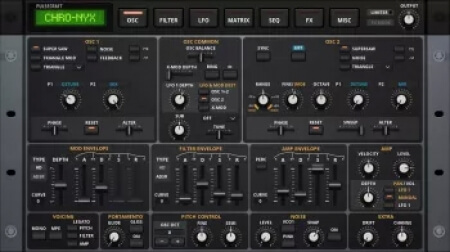
ohsie | 31 January 2026 | 41 MB
The heart of the iconic JP-8080.
The DNA of a complete synth rack.
All the features of a sought-after early analog modeling synth, plus the best elements from
legends like the Roland Jupiter 8, Access Virus, Nord Modular 2, Mono/Poly, and RADIAS.
Dozens of oscillator engines, waveshapers, and effects. 5 filter styles. A complete mod matrix.
Ideal for 80s analog synth music, 90s classic trance, modern EDM, digital hardcore.
The signature sound and magic of hardware at a fraction of the price.
NFO
home page
The DNA of a complete synth rack.
All the features of a sought-after early analog modeling synth, plus the best elements from
legends like the Roland Jupiter 8, Access Virus, Nord Modular 2, Mono/Poly, and RADIAS.
Dozens of oscillator engines, waveshapers, and effects. 5 filter styles. A complete mod matrix.
Ideal for 80s analog synth music, 90s classic trance, modern EDM, digital hardcore.
The signature sound and magic of hardware at a fraction of the price.
NFO
Note -
The Chro-Nyx.nicnt file needs to be added to your registry,
with the Kontakt library add tool. Otherwise Chro-Nyx will not work..
(Don't add with "Kontakt Portable" will not work)
----------------------------------------------------
Installation with Kontakt installed -
.Copy the Chro-Nyx folder & paste to where you keep your Reaktor Ensembles.
.Run the Kontakt library add tool & go to where your Reaktor Ensembles are,
then add the Chro-Nyx folder that contains the Chro-Nyx.nicnt file
----------------------------------------------------
Installation without Kontakt installed -
.Copy the Chro-Nyx folder & paste to where you keep your Reaktor Ensembles.
.Install the included Kontakt_Add_Library_Enabler_x64
.Run the Add Library desktop shortcut & go to where your Reaktor Ensembles are,
then add the Chro-Nyx folder that contains the Chro-Nyx.nicnt file
----------------------------------------------------
Reaktor v6.5.0+ required
Enjoy!
ohsie
The Chro-Nyx.nicnt file needs to be added to your registry,
with the Kontakt library add tool. Otherwise Chro-Nyx will not work..
(Don't add with "Kontakt Portable" will not work)
----------------------------------------------------
Installation with Kontakt installed -
.Copy the Chro-Nyx folder & paste to where you keep your Reaktor Ensembles.
.Run the Kontakt library add tool & go to where your Reaktor Ensembles are,
then add the Chro-Nyx folder that contains the Chro-Nyx.nicnt file
----------------------------------------------------
Installation without Kontakt installed -
.Copy the Chro-Nyx folder & paste to where you keep your Reaktor Ensembles.
.Install the included Kontakt_Add_Library_Enabler_x64
.Run the Add Library desktop shortcut & go to where your Reaktor Ensembles are,
then add the Chro-Nyx folder that contains the Chro-Nyx.nicnt file
----------------------------------------------------
Reaktor v6.5.0+ required
Enjoy!
ohsie
home page
Only registered users can see Download Links. Please or login.
No comments yet