

Windows
Joey Sturgis Tones JST Maximizer v1.0.7 [WiN]
SEnki | 02 February 2026 | 7.2 MB
All-in-one Mastering Plugin
JST Maximizer is the only plugin you need on your mix bus.
With a variety of maximization modes, bass-specific processing, controls for mid-side/stereo manipulation, and up to 16x oversampling, JST Maximizer is a feature-rich, all-in-one solution for your mastering needs. Whether you're a music creator, producer/mixer, or even a professional mastering engineer - JST Maximizer is the only plugin you'll need on your mix bus for fast and intuitive finalization of your mix.
JST Maximizer features more than a dozen ways to finalize your mix including:
Within each category, you'll have the ability to select between standard operating modes, modes dedicated to specific solutions, and even multi-band functionality. Maximizer goes a step further by including Multi-Stage, Smart & ARC modes in the Maximizers category for some of the most intelligent processing offered in a mastering plugin solution.
Hear the 'gain-matched examples' in action below:
Visualize your mix
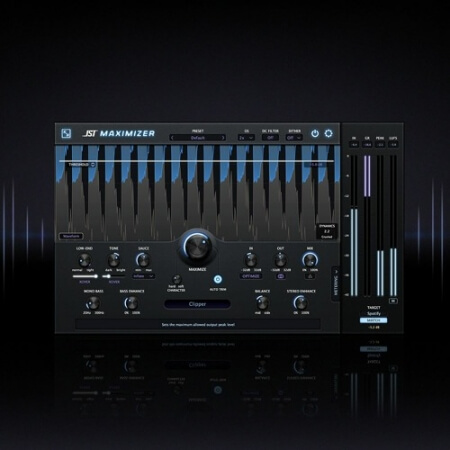
You've probably heard someone say “Don't mix with your eyes.” And while that's often true, sometimes there's stuff happening in your mix, in your plugins, across the frequency spectrum that you're just not hearing. Visualization is at the core of every great master bus processor and JST Maximizer is no exception. In the plugin's interface, you're able to toggle between a Waveform View and a Spectrum View to see how the plugin is affecting your audio in real-time, and other Spatial Visualizers.
Want to push your mix dynamics a bit harder? Flip over to the Waveform View and pull down your threshold so no dynamic range goes to waste.
Would you rather see the balance of your mix? The Spectrum View reacts to tonal changes you make in JST Maximizer so you can easily see if your bass is overpowering your mids & top-end and adjust accordingly.
Looking for even more visual tools? Additional stereo field visualizers are also available (Polar Sample, Polar Level and Lissajous), allowing you to analyze your audio, to see how it compares from left to right - checking for mono compatibility and spectral uniformity, amplitude and phase coherency.
Endless mastering possibilities
The real power of JST Maximizer comes from the 20+ controls provided in the plugin that impact every aspect of your mix from EQ to multiband compression to saturation and everything in between. We break these controls into 4 sections:
Dynamics & EQ
Mastering requires a particular set of features that aren't commonly found in stock plugins for things like compression and equalization. When working with a single source, you don't often have to worry about things like bass enhancement (outside of your bass track). For mastering, it's a key piece of the process.
JST Maximizer offers bass-focused compression controls with an adjustable crossover, bass enhancements, and the ability to keep bass mono below a certain frequency. When paired with tonal controls and harmonic saturation/excitement, there's a lot of power at your fingertips when working with dynamics in JST Maximizer.
With built-in dynamic monitoring, you'll even get an intuitive display describing the dynamic range of your music in near real-time.
In / Out / Mix
While levels can be an afterthought for many plugin manufacturers, we took extra special care to develop a powerful In/Out/Mix section for JST Maximizer. Engineers can manually set their input/output levels or rely on JST Maximizer's learning algorithm to automatically set the input based on the signal it's fed. From there, they're able to blend the processed and unprocessed signal with a Mix knob and our all-new delta monitoring - a unique monitoring control allowing you to hear the differences between your wet and dry signal. Think of it like a built-in null test for the plugin!
As an added bonus, JST Maximizer also allows users to toggle between stereo and mono output without ever leaving the plugin! Quickly check how your audio sounds when summed to mono to ensure your mixes translate on smaller devices and single-speaker playback systems.
Stereo Enhancements
JST Maximizer even includes controls for Mid-Side Balance and Stereo Enhancement - letting you further manipulate the space and width of your mix. Make your mix sound more upfront or wider with more control and precision than ever before!
Global Controls
With global controls, you are truly able to unlock the full potential of JST Maximizer. The list includes:
home page
JST Maximizer is the only plugin you need on your mix bus.
With a variety of maximization modes, bass-specific processing, controls for mid-side/stereo manipulation, and up to 16x oversampling, JST Maximizer is a feature-rich, all-in-one solution for your mastering needs. Whether you're a music creator, producer/mixer, or even a professional mastering engineer - JST Maximizer is the only plugin you'll need on your mix bus for fast and intuitive finalization of your mix.
JST Maximizer features more than a dozen ways to finalize your mix including:
- Clippers
- Limiters
- Maximizers
Within each category, you'll have the ability to select between standard operating modes, modes dedicated to specific solutions, and even multi-band functionality. Maximizer goes a step further by including Multi-Stage, Smart & ARC modes in the Maximizers category for some of the most intelligent processing offered in a mastering plugin solution.
Hear the 'gain-matched examples' in action below:
Visualize your mix
You've probably heard someone say “Don't mix with your eyes.” And while that's often true, sometimes there's stuff happening in your mix, in your plugins, across the frequency spectrum that you're just not hearing. Visualization is at the core of every great master bus processor and JST Maximizer is no exception. In the plugin's interface, you're able to toggle between a Waveform View and a Spectrum View to see how the plugin is affecting your audio in real-time, and other Spatial Visualizers.
Want to push your mix dynamics a bit harder? Flip over to the Waveform View and pull down your threshold so no dynamic range goes to waste.
Would you rather see the balance of your mix? The Spectrum View reacts to tonal changes you make in JST Maximizer so you can easily see if your bass is overpowering your mids & top-end and adjust accordingly.
Looking for even more visual tools? Additional stereo field visualizers are also available (Polar Sample, Polar Level and Lissajous), allowing you to analyze your audio, to see how it compares from left to right - checking for mono compatibility and spectral uniformity, amplitude and phase coherency.
Endless mastering possibilities
The real power of JST Maximizer comes from the 20+ controls provided in the plugin that impact every aspect of your mix from EQ to multiband compression to saturation and everything in between. We break these controls into 4 sections:
Dynamics & EQ
Mastering requires a particular set of features that aren't commonly found in stock plugins for things like compression and equalization. When working with a single source, you don't often have to worry about things like bass enhancement (outside of your bass track). For mastering, it's a key piece of the process.
JST Maximizer offers bass-focused compression controls with an adjustable crossover, bass enhancements, and the ability to keep bass mono below a certain frequency. When paired with tonal controls and harmonic saturation/excitement, there's a lot of power at your fingertips when working with dynamics in JST Maximizer.
With built-in dynamic monitoring, you'll even get an intuitive display describing the dynamic range of your music in near real-time.
In / Out / Mix
While levels can be an afterthought for many plugin manufacturers, we took extra special care to develop a powerful In/Out/Mix section for JST Maximizer. Engineers can manually set their input/output levels or rely on JST Maximizer's learning algorithm to automatically set the input based on the signal it's fed. From there, they're able to blend the processed and unprocessed signal with a Mix knob and our all-new delta monitoring - a unique monitoring control allowing you to hear the differences between your wet and dry signal. Think of it like a built-in null test for the plugin!
As an added bonus, JST Maximizer also allows users to toggle between stereo and mono output without ever leaving the plugin! Quickly check how your audio sounds when summed to mono to ensure your mixes translate on smaller devices and single-speaker playback systems.
Stereo Enhancements
JST Maximizer even includes controls for Mid-Side Balance and Stereo Enhancement - letting you further manipulate the space and width of your mix. Make your mix sound more upfront or wider with more control and precision than ever before!
Global Controls
With global controls, you are truly able to unlock the full potential of JST Maximizer. The list includes:
- 2x, 4x, 8x, or 16x Oversampling
- 8-bit, 12-bit, 16-bit, 20-bit, or 24-bit Dithering
- Optional DC Offset Filter
- Character Controls
- Auto-Trim, and more!
home page
Only registered users can see Download Links. Please or login.
No comments yet