

Windows
Joey Sturgis Tones JST Sky Box v1.1.7 [WiN]
SEnki | 02 February 2026 | 4.5 MB
Versatile Reverb Plugin
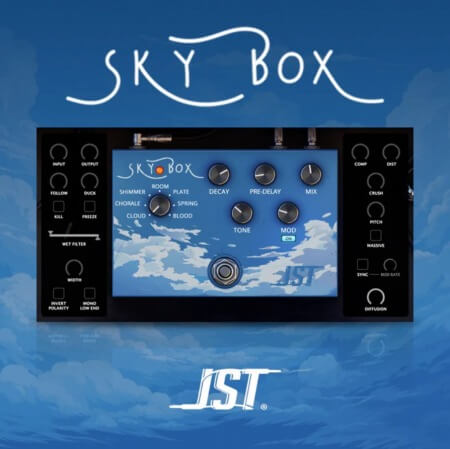
JST Sky Box is a versatile and charismatic reverb plugin for mixing and sound design.
Featuring 7 unique reverb modes and built-in modulation, JST Sky Box is the perfect solution for enhancing any instrument or vocal, big or small, all in one compact and easy to use plugin. Let's listen to a few examples:
Whether you're going for a short 80's slap back effect, cavernous ambiance that lives on for days, or maybe something that sounds like angels singing in the skies above - JST Sky Box delivers perfect algorithmic reverbs with ease using its no-brainer controls and very little CPU. Plus, it's fully automatable and includes over 100 presets!
Unique Reverb Modes
With 7 unique reverb modes to choose from, JST Sky Box has all kinds of tonal options worth exploring.
Cloud
This cloud-like reverb mode is both deep and ethereal, like a distant echo that seems to be coming from all around you. It is a sound that is both calming and unsettling, and it can be difficult to tell where it is coming from or where it is going.
Chorale
A chorusing reverb mode perfect for long, sustained notes that echo and fade away, like a choir singing in a large, empty space. It is often used in music to create a sense of awe or mystery via modulation.
Shimmer
A shimmery reverb mode characterized by its bright, sparkling sound. It can be used to create a light, airy effect or something a bit sharper as needed.
Room
The Room reverb emulates the sound of the input signal bouncing off the walls of a live room, creating a sense of spaciousness and depth. It is often used in music to create a more natural or intimate sound.
Plate
The Plate reverb mode simulates the sound of the input signal bouncing off of a metal plate. It is characterized by a long, smooth decay and a bright, metallic sound.
Spring
The Spring reverb mode creates a lush, echoing sound by emulating the sound of your audio signal being routed through a coil of spring, which vibrates and creates a decaying sound.
Blood
A dark and ominous reverb mode; the sound of something evil lurking in the shadows, waiting to strike. It is the sound of fear and dread, and it makes your heart race.
6 Mode Specific Controls
Dial in each and every reverb mode with controls tailored to the algorithm you're working with. Depending on the mode you're in, these controls will help you achieve a wide variety of sounds in just seconds.
Decay
The Decay knob controls how long the reverb effect lasts after the input signal stops. A longer decay will create a more spacious sound, while a shorter decay will create a more immediate sound.
Pre-Delay
The Pre-Delay knob is used to create a sense of space by delaying the reverb signal by a short amount of time. This can be used to make a sound appear to be coming from a different location, or to add depth and richness to a sound.
Mod
The Mod knob adjusts the amount of modulation that's applied to your reverb effect over time. This creates movement and complexity within your sound.
Modulation can be bypassed altogether using the provided On/Off Switch.
Tone
The Tone knob controls the high frequencies of your reverb's signal. Turning it clockwise increases the high frequencies, while turning it counterclockwise decreases them.
Mix
The Mix knob controls the balance between the dry (original) signal and the wet (reverb) signal. By adjusting the mix knob, you can create a variety of effects, from a subtle, natural-sounding reverb to a more dramatic, otherworldly sound.
home page
JST Sky Box is a versatile and charismatic reverb plugin for mixing and sound design.
Featuring 7 unique reverb modes and built-in modulation, JST Sky Box is the perfect solution for enhancing any instrument or vocal, big or small, all in one compact and easy to use plugin. Let's listen to a few examples:
Whether you're going for a short 80's slap back effect, cavernous ambiance that lives on for days, or maybe something that sounds like angels singing in the skies above - JST Sky Box delivers perfect algorithmic reverbs with ease using its no-brainer controls and very little CPU. Plus, it's fully automatable and includes over 100 presets!
Unique Reverb Modes
With 7 unique reverb modes to choose from, JST Sky Box has all kinds of tonal options worth exploring.
Cloud
This cloud-like reverb mode is both deep and ethereal, like a distant echo that seems to be coming from all around you. It is a sound that is both calming and unsettling, and it can be difficult to tell where it is coming from or where it is going.
Chorale
A chorusing reverb mode perfect for long, sustained notes that echo and fade away, like a choir singing in a large, empty space. It is often used in music to create a sense of awe or mystery via modulation.
Shimmer
A shimmery reverb mode characterized by its bright, sparkling sound. It can be used to create a light, airy effect or something a bit sharper as needed.
Room
The Room reverb emulates the sound of the input signal bouncing off the walls of a live room, creating a sense of spaciousness and depth. It is often used in music to create a more natural or intimate sound.
Plate
The Plate reverb mode simulates the sound of the input signal bouncing off of a metal plate. It is characterized by a long, smooth decay and a bright, metallic sound.
Spring
The Spring reverb mode creates a lush, echoing sound by emulating the sound of your audio signal being routed through a coil of spring, which vibrates and creates a decaying sound.
Blood
A dark and ominous reverb mode; the sound of something evil lurking in the shadows, waiting to strike. It is the sound of fear and dread, and it makes your heart race.
6 Mode Specific Controls
Dial in each and every reverb mode with controls tailored to the algorithm you're working with. Depending on the mode you're in, these controls will help you achieve a wide variety of sounds in just seconds.
Decay
The Decay knob controls how long the reverb effect lasts after the input signal stops. A longer decay will create a more spacious sound, while a shorter decay will create a more immediate sound.
Pre-Delay
The Pre-Delay knob is used to create a sense of space by delaying the reverb signal by a short amount of time. This can be used to make a sound appear to be coming from a different location, or to add depth and richness to a sound.
Mod
The Mod knob adjusts the amount of modulation that's applied to your reverb effect over time. This creates movement and complexity within your sound.
Modulation can be bypassed altogether using the provided On/Off Switch.
Tone
The Tone knob controls the high frequencies of your reverb's signal. Turning it clockwise increases the high frequencies, while turning it counterclockwise decreases them.
Mix
The Mix knob controls the balance between the dry (original) signal and the wet (reverb) signal. By adjusting the mix knob, you can create a variety of effects, from a subtle, natural-sounding reverb to a more dramatic, otherworldly sound.
home page
Only registered users can see Download Links. Please or login.
No comments yet