

Windows
Orra Audio Orra Tone Zone v1.1.31 [WiN]
MOCHA | 19 April 2026 | 4.7 MB
Tonal Curve Corrector
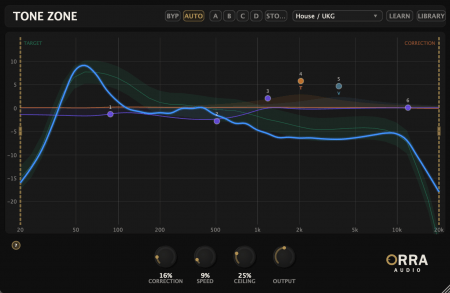
Analyze, correct, and sculpt your tonal curve in one plugin. See where your mix sits against professional targets and fine-tune with a full parametric EQ and per-band saturation.
* 40-band spectral analysis with smooth tonal curve display
* 24 genre target curves calibrated from professional masters
* Reference track learning from any audio file
* FFT-based auto-corrective EQ with level-aware processing
* 6-band parametric EQ overlay with draggable nodes
* Per-band analog saturation: Tube, VCA, British
* A/B/C/D comparison - four slots for fast settings auditioning
* Auto Correction Toggle - Disable tonal correction while maintaining consistent latency for reliable PDC on any track
* Internal Bypass (BYP) - clean crossfade bypass with analysis always live
* Fine Control - Shift+scroll for precise Q, Shift+drag for fine frequency/gain
Keep your tonal curve in the zone
Not just a meter.
Most tonal analysis tools stop at showing you the problem. Tone Zone goes further - it analyzes, corrects, and lets you fine-tune by hand, all in the same window without switching plugins.
Traditional Approach
Open a metering plugin to see your tonal curve. Spot the issues. Switch to a separate EQ to make corrections. Flip back to the meter to check your work. Repeat until it looks right - or until you run out of patience.
See the problem in one plugin, fix it in another.
The Orra Way
See your tonal curve against a genre target. Turn up the correction knob and the FFT-based EQ nudges your spectrum toward the target automatically. Then fine-tune with a 6-band parametric EQ and add per-band saturation - all in the same window, all updating in real time.
Analyze, correct, and sculpt without ever switching plugins.
home page
Analyze, correct, and sculpt your tonal curve in one plugin. See where your mix sits against professional targets and fine-tune with a full parametric EQ and per-band saturation.
* 40-band spectral analysis with smooth tonal curve display
* 24 genre target curves calibrated from professional masters
* Reference track learning from any audio file
* FFT-based auto-corrective EQ with level-aware processing
* 6-band parametric EQ overlay with draggable nodes
* Per-band analog saturation: Tube, VCA, British
* A/B/C/D comparison - four slots for fast settings auditioning
* Auto Correction Toggle - Disable tonal correction while maintaining consistent latency for reliable PDC on any track
* Internal Bypass (BYP) - clean crossfade bypass with analysis always live
* Fine Control - Shift+scroll for precise Q, Shift+drag for fine frequency/gain
Keep your tonal curve in the zone
Not just a meter.
Most tonal analysis tools stop at showing you the problem. Tone Zone goes further - it analyzes, corrects, and lets you fine-tune by hand, all in the same window without switching plugins.
Traditional Approach
Open a metering plugin to see your tonal curve. Spot the issues. Switch to a separate EQ to make corrections. Flip back to the meter to check your work. Repeat until it looks right - or until you run out of patience.
See the problem in one plugin, fix it in another.
The Orra Way
See your tonal curve against a genre target. Turn up the correction knob and the FFT-based EQ nudges your spectrum toward the target automatically. Then fine-tune with a 6-band parametric EQ and add per-band saturation - all in the same window, all updating in real time.
Analyze, correct, and sculpt without ever switching plugins.
This plugin is Pay What You Want (FREE/PWYW), but still need a license key.
home page
Only registered users can see Download Links. Please or login.
No comments yet