

Windows / Mac OSX
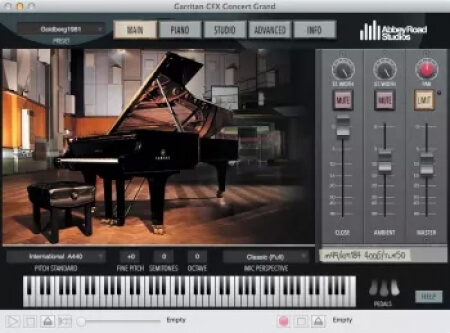
Garritan Abbey Road Studios CFX Concert Grand v1.010 [WiN, MacOSX]
ItUsed | 15 May 2026 | 20.3 GB
We placed the awe-inspiring Yamaha CFX Concert Grand Piano in Abbey Road Studio One, where award-winning engineers used the world's greatest microphones and equipment to create a stunning virtual instrument library.
Every facet of this project reflects the perfection that only the most passionate can produce: the instrument, the room, the engineers, and the mics. Experience the passion reflected in every detail.
home page
Every facet of this project reflects the perfection that only the most passionate can produce: the instrument, the room, the engineers, and the mics. Experience the passion reflected in every detail.
Advantages of this version:
- All samples are now in flac. The full size of the instrument: +- 20GB.
- All samples, of all microphone positions have been cleared of noise.
- All samples are now in flac. The full size of the instrument: +- 20GB.
- All samples, of all microphone positions have been cleared of noise.
1. Run the official installer from the "1. installers" folder.
2. Enable in the installer: "Samples Installations" - select "Full Samples Installation (122Gb)".
3. Skip all errors with the "OK" button, close the installer.
4. Extract and replace Programs into: "Garritan\CFX Concert Grand\Programs". (File tree "Programs": https://pastebin.com/4LSQhSrs)
5. Extract samples into: "Garritan\CFX Concert Grand\Data\CFX_Samples". (File tree "CFX_Samples": https://pastebin.com/uKCVDFys)
6. Launch, click on the preset load (top left), change the file type in Explorer from "*.ARIA" to "*.", find the license (license is a "out11566526-6091.png""), click open, or via Drag'n Drop.
2. Enable in the installer: "Samples Installations" - select "Full Samples Installation (122Gb)".
3. Skip all errors with the "OK" button, close the installer.
4. Extract and replace Programs into: "Garritan\CFX Concert Grand\Programs". (File tree "Programs": https://pastebin.com/4LSQhSrs)
5. Extract samples into: "Garritan\CFX Concert Grand\Data\CFX_Samples". (File tree "CFX_Samples": https://pastebin.com/uKCVDFys)
6. Launch, click on the preset load (top left), change the file type in Explorer from "*.ARIA" to "*.", find the license (license is a "out11566526-6091.png""), click open, or via Drag'n Drop.
home page
Only registered users can see Download Links. Please or login.
No comments yet