

Windows
Session Loops VocalNet v1.6.0 [WiN]
P2P | 02 June 2026 | 434 MB
Real-Time Voice Cloning & Transformation Plugin
Transform any vocal in real-time with VocalNet's AI voice engine. Change timbre, pitch, and style instantly.
Clone & Transform Voices in Three Steps
1. Import Voice Samples
VocalNet analyzes the imported samples and clones them as target voices. The cleaner and less processed the samples, the higher the quality of the transformations.
2. Transform Input Voice
Start playback on your audio track - VocalNet will convert the input in real time to match the target voices as an audio effect.
3. Morph Between Voices
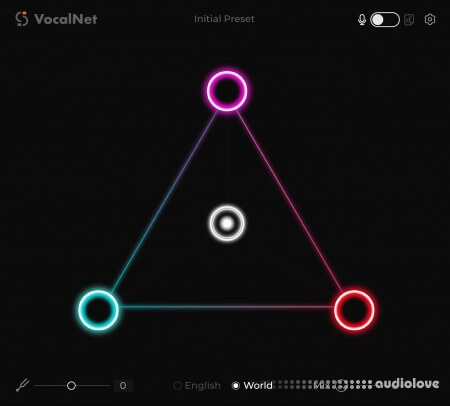
Load up to three voices, then drag the cursor to blend them into a unique tone in real time.
Full DAW Integration with ARA Support
VocalNet supports ARA workflows for compatible DAWs, so you can work directly on your track timeline with faster, tighter integration and a smoother editing experience.
home page
Transform any vocal in real-time with VocalNet's AI voice engine. Change timbre, pitch, and style instantly.
Clone & Transform Voices in Three Steps
1. Import Voice Samples
VocalNet analyzes the imported samples and clones them as target voices. The cleaner and less processed the samples, the higher the quality of the transformations.
2. Transform Input Voice
Start playback on your audio track - VocalNet will convert the input in real time to match the target voices as an audio effect.
3. Morph Between Voices
Load up to three voices, then drag the cursor to blend them into a unique tone in real time.
Full DAW Integration with ARA Support
VocalNet supports ARA workflows for compatible DAWs, so you can work directly on your track timeline with faster, tighter integration and a smoother editing experience.
Opening a project with a saved instance of the plugin will cause the loaded audio samples/presets in the corners of the triangle to not show. This is fixed by changing the sample/preset on any one of the circles.
The plugin does not open in the default triangle view in Reaper. It can be switched back to the triangle view by using the switch on the top right and top center of the plugin.
These are bugs, among other UI glitches, present in the original plugin and have nothing to do with our patch.
(Selecting other artists in Artist Mode is server-sided and, hence, isn't patched. You can load any singer's voice using their audio sample anyway.)
Use responsibly!
The plugin does not open in the default triangle view in Reaper. It can be switched back to the triangle view by using the switch on the top right and top center of the plugin.
These are bugs, among other UI glitches, present in the original plugin and have nothing to do with our patch.
(Selecting other artists in Artist Mode is server-sided and, hence, isn't patched. You can load any singer's voice using their audio sample anyway.)
Use responsibly!
home page
Only registered users can see Download Links. Please or login.
Comments